When you’re coding in Python, encountering a “syntax error” can be one of the most common obstacles you’ll face. These errors occur when the Python interpreter cannot understand the code you’ve written because it doesn’t adhere to the proper syntax rules of the language. In this guide, we’ll explore what a syntax error means, common examples of syntax errors in Python, and how to fix them to get your code running smoothly.
What Does a Syntax Error Mean in Python?
In programming, syntax refers to the set of rules that defines the structure of valid statements in a language. If your code breaks these rules, Python will raise a “SyntaxError,” indicating that something is wrong with how the code is written. This can range from missing punctuation to misplaced keywords or incorrect formatting.
For example, in Python, if you forget to close a parenthesis, you’ll likely encounter a SyntaxError: unexpected EOF while parsing. This tells you that Python reached the end of your file and couldn’t find the proper closure for the open parentheses.
Common SyntaxError Examples in Python
Here are a few examples of basic syntax errors you might encounter in Python:
Missing Colon in Conditional Statements
if x > 10 print(“x is greater than 10”)
In this case, Python expects a colon after the if statement. The correct version is:
if x > 10:
    print("x is greater than 10")
Unmatched Parentheses or Brackets
print("Hello, World!"
Here, the closing parenthesis is missing, which results in a SyntaxError. The fixed code should look like:

print("Hello, World!")

Incorrect Indentation

Python uses indentation to define the structure of the code, and inconsistent indentation will lead to a SyntaxError:

def my_function():
print("Hello")

The correct indentation would be:

def my_function():
    print("Hello")

SyntaxError in SQL and Python

Sometimes, you might encounter a syntax error in SQL when writing queries. For example, if you forget to specify a table name or use incorrect SQL keywords, you might see an error like “You have an error in your SQL syntax.” This is a similar concept to Python’s invalid syntax errors, though the specific causes are different due to the rules of SQL.

If you're trying to integrate Python with SQL, you could encounter a syntax error near unexpected token if there’s an issue with how the SQL query is formatted within your Python code. For instance, an extra comma, missing quote, or wrong order of clauses could trigger such an error.

How to Fix Syntax Errors

Check for Typos and Missing Characters
The first step in fixing a syntax error is to carefully read through the line where the error was raised. Look for common mistakes like missing colons, parentheses, or quotes.

Use Proper Indentation

Python relies heavily on indentation. Ensure you’re using consistent indentation (typically 4 spaces per indentation level) to define code blocks such as loops, conditionals, and functions.

Check for Matching Parentheses, Brackets, and Quotes
Make sure that every opening parenthesis, square bracket, or quote has a matching closing counterpart. This is one of the most common sources of SyntaxError in Python.

Review Your Logic and Syntax Rules

If your code runs into an invalid syntax error, check that you’re following Python’s syntax rules. For example, Python does not allow semicolons at the end of statements, unlike some other programming languages.


Syntax errors are a normal part of coding in Python, and they often stem from simple mistakes like typos or improper formatting. By understanding what invalid syntax means, looking at common syntax error examples, and following best practices for coding in Python, you can quickly identify and fix these issues. Whether you're dealing with a simple typo or a more complex error, always read the error message carefully—Python will usually give you a pretty good idea of where the problem lies!

By practicing good syntax habits and double checking your code, you’ll minimize the chances of encountering syntax errors, and when they do occur, you’ll be able to solve them with ease.
In the ever evolving world of software, backend development stands as the bedrock of every application, powering everything from your favorite social media app to critical financial systems. But how do you navigate this complex landscape? The answer lies not just in writing code, but in designing systems.
Inspired by the acclaimed system design teachings of ByteByteGo (Alex Xu), this roadmap isn’t just about learning syntax; it’s about understanding the “why” and “how” behind scalable, resilient, and performant backend architectures. Let’s embark on your journey to becoming a backend development maestro in 2026.
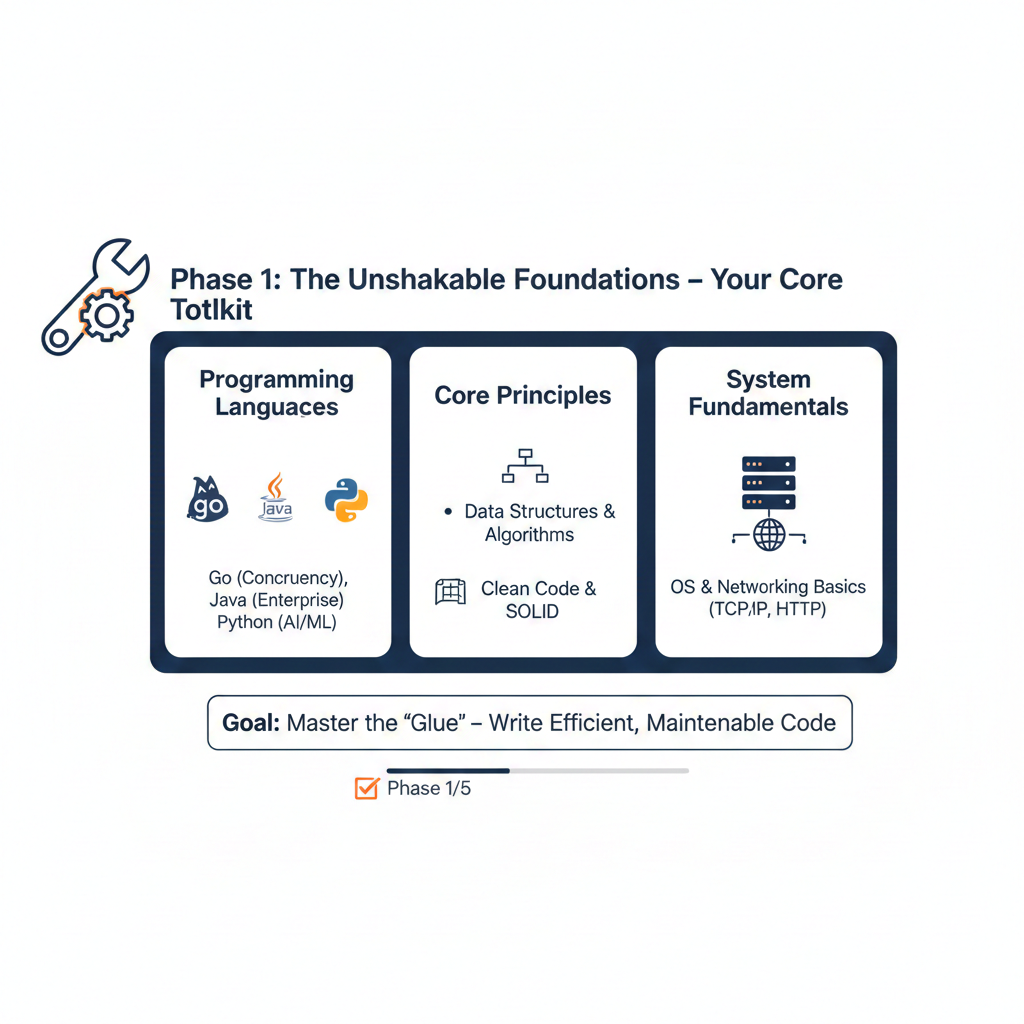
Foundations Your Core Toolkit
Before you can build skyscrapers, you need a strong foundation. This phase focuses on mastering the fundamental tools and principles that underpin all robust backend systems.
Key Learnings:
Clean Code & SOLID Principles: Writing maintainable, extensible, and readable code is paramount for long term project health.
Programming Languages: Deep dive into Go (for high concurrency, network services), Java/Spring Boot (for enterprise grade, robust applications), or Python/FastAPI (for rapid development, AI/ML integration). Understand their strengths and weaknesses.
Data Structures & Algorithms: Essential for optimizing code efficiency and solving complex problems.
Operating Systems & Networking Basics: How your code interacts with the underlying infrastructure (TCP/IP, HTTP/S).
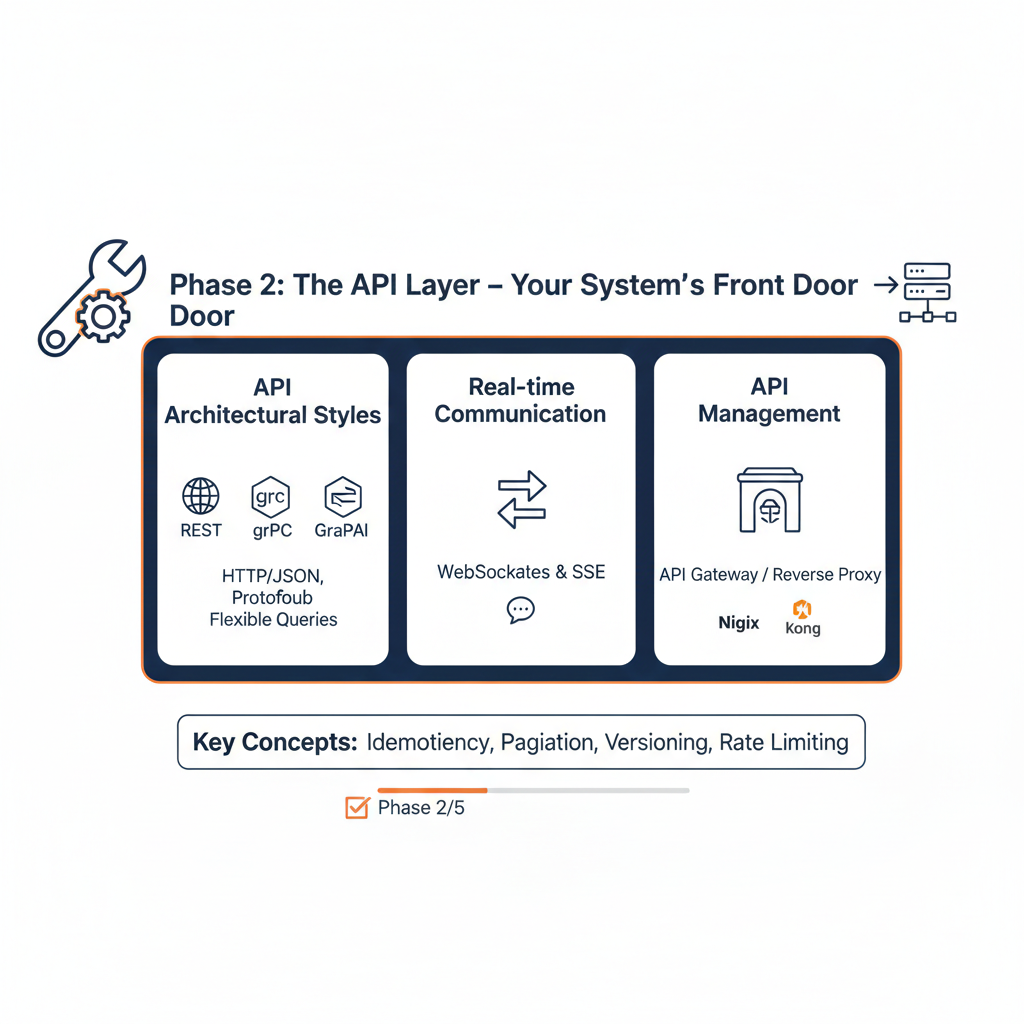
Phase 2: The API Layer Your System’s Front Door
The API (Application Programming Interface) is the contract between your backend and the outside world (frontend, mobile apps, other services). Mastering it means designing clear, efficient, and reliable communication.
Key Learnings:
WebSockets & Server Sent Events (SSE): For real time applications (chat, notifications, live dashboards).
RESTful APIs: The industry standard. Understand resources, HTTP methods, status codes, and statelessness.
gRPC: For high performance, low latency inter service communication using Protocol Buffers. Ideal for microservices.
GraphQL: Empowering clients to request exactly what they need, solving over fetching and under fetching.
API Gateways: Centralizing concerns like authentication, rate limiting, and routing (e.g., Nginx, Kong, AWS API Gateway).
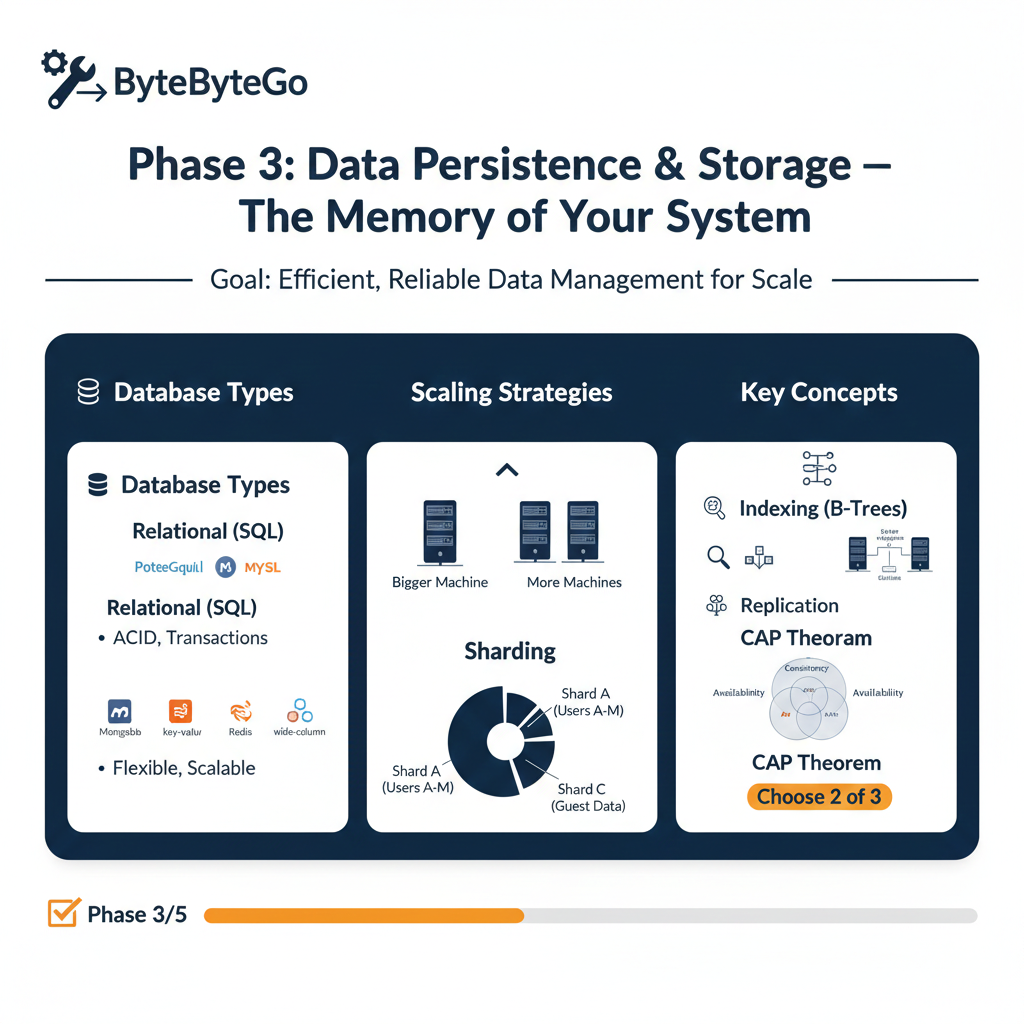
Phase 3: Data Persistence & Storage – The Memory of Your System
Data is the lifeblood of any application. This phase is crucial for understanding how to store, retrieve, and manage data efficiently and reliably. This is often where scalability challenges emerge.
Database Scaling Strategies: Vertical vs. Horizontal Scaling, Database Sharding, Replication (Read Replicas, Master Slave), and understanding eventual consistency.
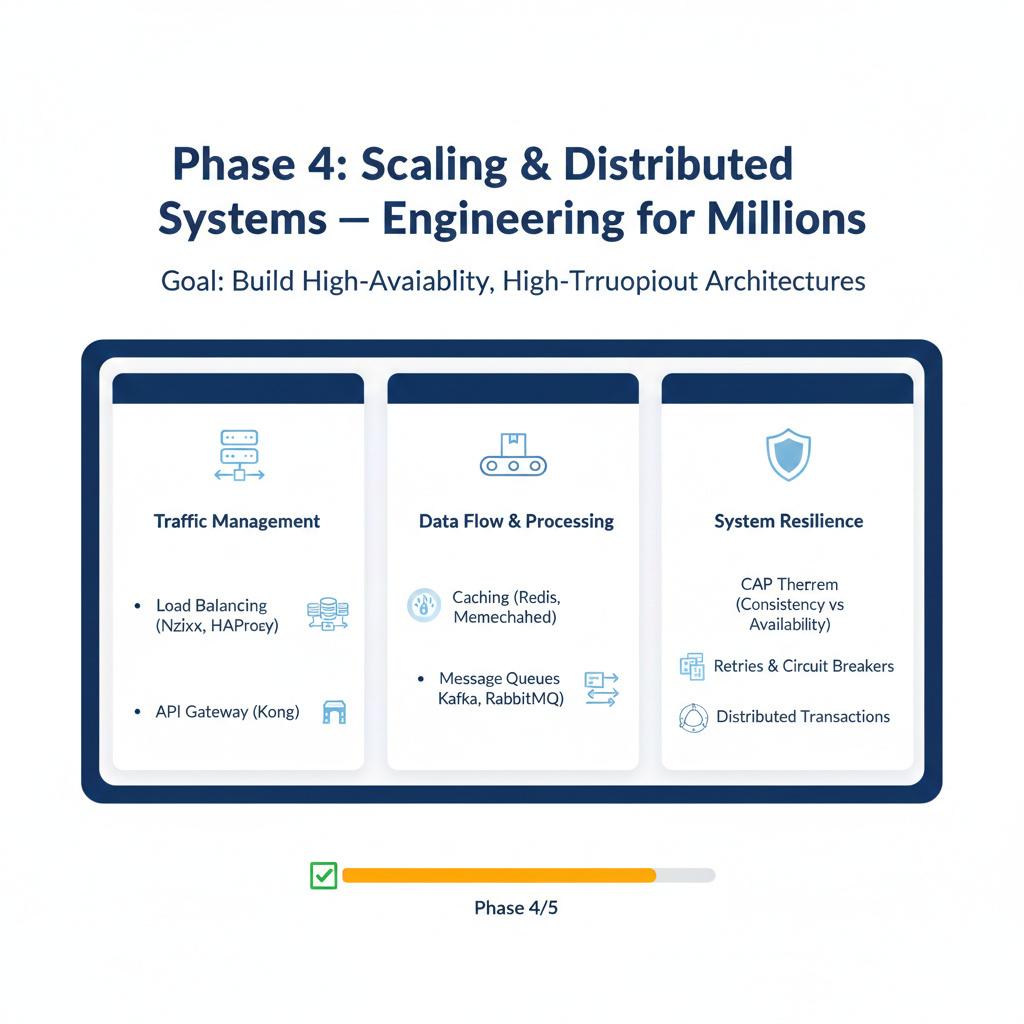
Phase 4: Scaling & Distributed Systems Engineering for Millions
This is where backend development transcends coding and becomes true system design. Learn how to handle immense user loads and ensure continuous availability.
Key Learnings:
Load Balancing: Distributing traffic efficiently across multiple servers (e.g., Round Robin, Least Connections).
Caching: Implementing strategies like Cache Aside, Write Through, and understanding eviction policies (LRU, LFU) with tools like Redis or Memcached.
Message Queues/Brokers: Decoupling services for asynchronous processing and reliability (e.g., Kafka, RabbitMQ, SQS). Essential for microservices.
Concurrency & Parallelism: Designing systems that can perform multiple tasks simultaneously.
CAP Theorem & Consistency Models: Understanding the trade offs in distributed systems (Consistency, Availability, Partition Tolerance). What does “eventual consistency” really mean?
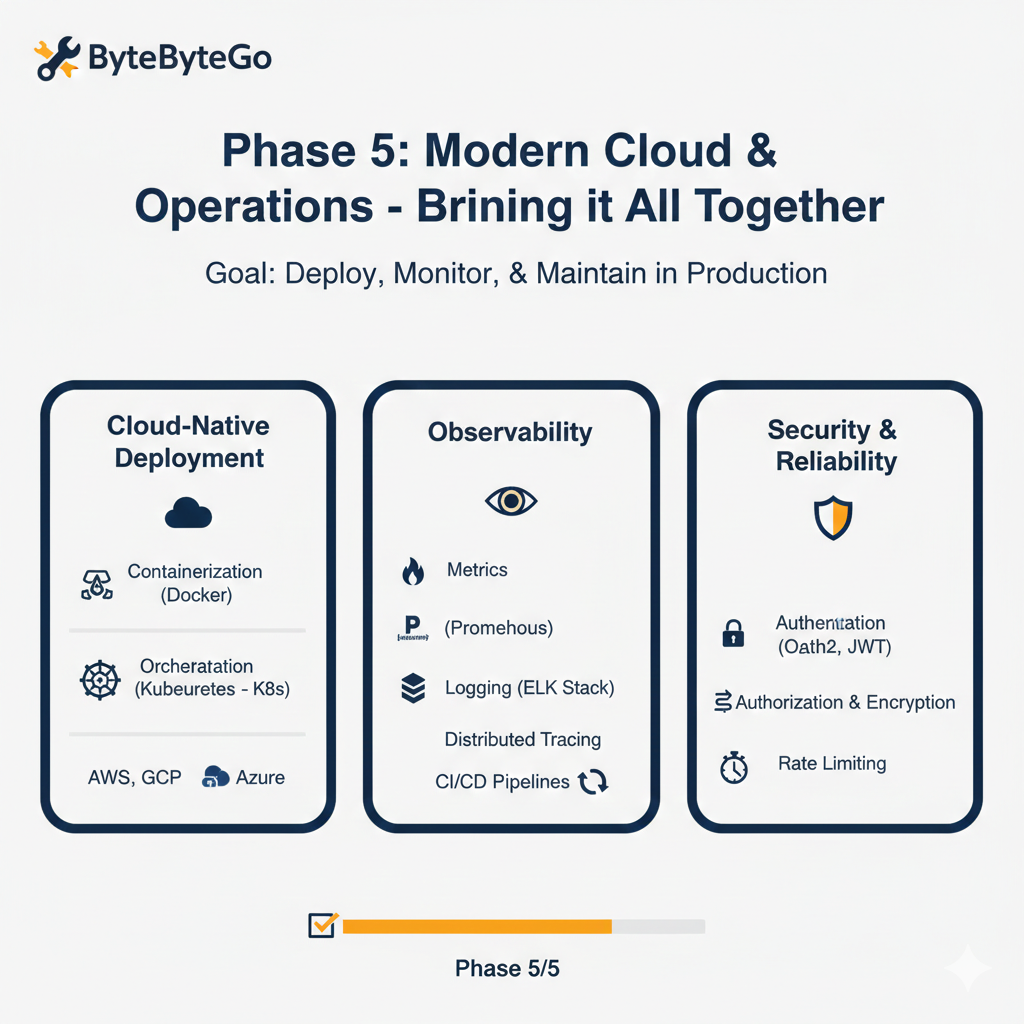
Phase 5: Modern Cloud & Operations – Bringing it All Together
Today’s backend systems live in the cloud. This phase covers deployment, monitoring, and maintaining your applications in production.
Key Learnings:
Containerization (Docker): Packaging your applications and dependencies into isolated units.
Orchestration (Kubernetes K8s): Automating deployment, scaling, and management of containerized applications.
Cloud Platforms: Familiarity with AWS, GCP, or Azure services (e.g., EC2, S3, Lambda, RDS).
CI/CD (Continuous Integration/Continuous Deployment): Automating your build, test, and deployment pipelines.
Observability: The “Three Pillars”:
Metrics: Collecting and monitoring system performance (Prometheus, Grafana).
Distributed Tracing: Understanding request flow across microservices (Jaeger, Zipkin).
Security Best Practices: Authentication (OAuth2, JWT), Authorization, data encryption, and vulnerability management.
Becoming a world class backend engineer in 2026 is no longer just about mastering a single programming language or framework. As the ByteByteGo philosophy teaches us, the real magic happens when you understand how different components databases, load balancers, message queues, and caches—interact to form a cohesive, resilient system.
This roadmap is a marathon, not a sprint. Start by building a rock solid foundation in your chosen language, then gradually layer on the complexities of data persistence and distributed systems. Remember, every major platform, from Netflix to Uber, started with a simple architecture that evolved through the very principles outlined here.
Key Takeaways for Your Journey:
Think in Trade offs: Every architectural choice (like SQL vs. NoSQL) has pros and cons. Learning to weigh these is the hallmark of a senior engineer.
Prioritize Observability: You cannot improve what you cannot measure. Build monitoring into your systems from day one.
Stay Curious: The backend landscape shifts rapidly. Keep experimenting with new technologies like Vector Databases for AI or WASM for edge computing.
By following this structured path, you aren’t just learning to “code the back”; you are learning to engineer the future.
Debugging code is the unsung hero of software development, a craft that separates the good from the great. It’s where logic meets persistence, and in 2025, AI is transforming this process from a grind into a superpower. Tools like GitHub Copilot, Devin AI, Tabnine, and others are empowering developers to squash bugs faster, smarter, and with less frustration. Whether you’re a junior developer cutting your teeth on your first project, a seasoned engineer tackling sprawling codebases, or a tech enthusiast curious about the future of coding, this guide dives deep into how AI can elevate your debugging game. Let’s explore the landscape, share practical examples, and uncover the best prompts to make AI your debugging sidekick.
The AI Debugging Revolution
Gone are the days of staring at error logs for hours or peppering Stack Overflow with questions. AI-powered debugging tools are now context-aware, proactive, and capable of reasoning through complex problems. They don’t just flag errors they suggest fixes, explain issues, and even anticipate bugs before they bite. Here’s a rundown of the top players in 2025 and how they’re reshaping debugging:
GitHub Copilot: Your Real-Time Bug Buster
GitHub Copilot, powered by advanced models like GPT-4o and Claude 3.5 Sonnet, is a staple in many developers’ toolkits. Integrated into IDEs like Visual Studio Code and JetBrains, it offers real-time code suggestions, error detection, and debugging assistance. Copilot shines in its ability to analyze your codebase’s context, flagging issues like uninitialized variables or inefficient loops as you type.
Strengths: Inline suggestions, multi-file awareness, and a conversational chat interface for debugging queries. Its /fix slash command lets you highlight buggy code and get tailored solutions.
Best For: Developers who want a seamless, IDE-integrated experience for quick fixes and iterative debugging.
Example in Action: Imagine you’re writing a Python function to calculate a Fibonacci sequence, but it’s throwing an IndexError. Copilot notices the off-by-one error in your loop and suggests: python
Copy
def fibonacci(n):
if n <= 0:
return []
fib = [0, 1]
for i in range(2, n):
fib.append(fib[i-1] + fib[i-2])
return fib[:n] # Copilot suggests slicing to avoid index issues
You prompt Copilot with, “Why is my Fibonacci function failing for n=1?” It responds: “Your function assumes n ≥ 2. For n=1, it tries accessing fib[1], which causes an error. Add a condition to return [0] for n=1.”
Prompt Tip: Be specific. Instead of “Fix my code,” try: “Debug this Python function for an IndexError when n=1.” For complex issues, use: “Explain why this loop causes a runtime error and suggest a fix.”
Devin AI: The Autonomous Debug Detective
Devin AI, developed by Cognition, takes debugging to another level by acting as an autonomous “software engineer.” Unlike Copilot’s suggestion-based approach, Devin can independently analyze codebases, reproduce bugs, and propose end-to-end fixes sometimes even opening pull requests. It’s particularly strong in handling multi-file projects and open-source maintenance.
Strengths: Long-term reasoning, autonomous bug reproduction, and integration with tools like GitHub for workflow automation. Devin excels at tackling intricate bugs that span multiple modules.
Best For: Teams or solo developers working on large projects where manual debugging is time-intensive.
Example in Action: You’re maintaining a Node.js app, and a GitHub issue reports a bug in a payment processing module. You tag Devin in Slack: “Investigate and fix the null reference error in payment.js.” Devin clones the repo, traces the issue to a missing null check, and submits a pull request:
javascript
Copy
async function processPayment(order) {
if (!order?.amount) { // Devin adds null check
throw new Error(“Invalid order amount”);
}
return await paymentGateway.charge(order.amount);
}
} Devin’s report explains: “The bug occurred because order amount was undefined for canceled orders. Added a null check to prevent runtime errors.”
Prompt Tip: Give Devin clear instructions: “Reproduce the bug in issue #123 and propose a fix.” For vague issues, try: “Analyze this codebase for potential null pointer errors and suggest improvements.” Avoid overloading Devin with ambiguous tasks it thrives on specificity.
Tabnine: The Privacy-First Code Whisperer
Tabnine is a privacy-focused AI tool that offers personalized code completions and debugging suggestions. Unlike cloud-heavy tools, Tabnine can run locally, making it ideal for teams handling sensitive code. Its deep learning models adapt to your coding style, catching subtle bugs like inconsistent variable naming or deprecated API calls.
Strengths: Offline capabilities, codebase-specific suggestions, and lightweight integration with most IDEs. Tabnine’s AI Code Review feature flags potential issues before commits.
Best For: Security-conscious developers or those working in niche frameworks where generic AI models fall short.
Example in Action: You’re refactoring a Java Spring Boot app, and Tabnine highlights a potential SQL injection vulnerability: java
Copy
// Before
String query = “SELECT * FROM users WHERE id = ” + userId;
// Tabnine suggests:
String query = “SELECT * FROM users WHERE id = ?”;
You ask Tabnine, “Why is my original query unsafe?” It explains: “Concatenating userId directly into the query allows malicious input to alter the SQL. Use parameterized queries to prevent injection.”
Prompt Tip: Use natural language for clarity: “Check this Java method for security vulnerabilities.” For optimization, try: “Suggest ways to improve the performance of this database query.” Tabnine responds best to focused, context-rich prompts.
Other Notable Tools
DeepCode (Snyk): Specializes in real-time vulnerability detection, catching security bugs like XSS or SQL injection. Best for teams prioritizing secure coding practices. Prompt example: “Scan this JavaScript file for XSS vulnerabilities.”
Bito Wingman: An autonomous agent similar to Devin, with strengths in automating repetitive tasks like test case generation. Great for streamlining debugging workflows. Prompt example: “Generate unit tests to catch edge cases in this Python function.”
Amazon CodeWhisperer: Optimized for AWS ecosystems, it suggests fixes for AWS API-related bugs. Ideal for cloud developers. Prompt example: “Debug this Lambda function for timeout errors.”
Debugging with AI: Best Practices and Prompts
AI tools are only as good as the prompts you feed them. Here’s how to maximize their debugging potential, with examples tailored to different scenarios:
Be Specific About the Problem Vague prompts like “My code is broken” yield generic responses. Instead, pinpoint the issue:
Prompt: “Debug this React component that crashes when props, data is undefined.”
Why It Works: The AI focuses on the component and the specific condition (undefined props), suggesting a fix like adding a default prop or conditional rendering.
Provide Context Share relevant details about your codebase, language, or framework:
Prompt: “In this Django view, why does the queryset return empty results for authenticated users?”
Why It Works: Mentioning “Django view” and “authenticated users” helps the AI analyze session or permission issues, rather than guessing blindly.
Ask for Explanations Understanding why a bug occurs prevents future mistakes:
Prompt: “Explain why this C++ pointer causes a segmentation fault and suggest a fix.”
Why It Works: The AI not only proposes a solution (e.g., null checks or smart pointers) but also clarifies the memory management error.
Iterate with Feedback If the AI’s suggestion doesn’t work, refine your prompt:
Prompt: “Your fix for the TypeError didn’t work because the input is a string. Suggest another solution.”
Why It Works: The AI adjusts its approach, perhaps proposing type casting or validation.
Test Edge Cases Ask the AI to simulate or verify fixes:
Prompt: “Write unit tests to ensure this JavaScript function handles null inputs correctly.”
Why It Works: The AI generates tests to confirm the bug is resolved, saving you manual effort.
Example Workflow: Debugging a Real-World Bug
Let’s walk through a scenario using GitHub Copilot and Devin AI together. You’re building a Flask API, and your endpoint is returning a 500 error for certain inputs. The code:
python
Copy
@app.route(“/user/<id>”)
def get_user(id):
user = db.query(User).get(id)
return jsonify({“name”: user.name})
You notice the error occurs when the user ID doesn’t exist. You ask Copilot: “Debug this Flask endpoint for a 500 error when the ID is invalid.” Copilot suggests:
python
Copy
@app.route(“/user/<id>”)
def get_user(id):
user = db.query(User).get(id)
if not user:
return jsonify({“error”: “User not found”}), 404
return jsonify({“name”: user.name})
This fixes the immediate issue, but you suspect similar bugs elsewhere. You task Devin: “Scan my Flask project for endpoints missing error handling and propose fixes.” Devin identifies three other routes with the same flaw, submits a pull request with try-catch blocks, and adds logging for debugging future issues. The result? A robust API and hours saved.
Challenges and Limitations
AI debugging isn’t flawless. Here are pitfalls to watch for:
Overreliance: AI can suggest incorrect or insecure fixes (e.g., bypassing validation for convenience). Always review suggestions critically.
Context Blind Spots: Tools like Copilot may miss project-specific conventions unless you provide clear prompts. Devin can struggle with highly abstract bugs requiring human intuition.
Cost and Access: Devin’s $500/month price tag is steep for solo developers, while Copilot’s free tier has limits (2,000 completions/month). Tabnine’s local model requires decent hardware.
Learning Curve: Junior developers may need practice crafting effective prompts to unlock AI’s full potential.
The Human Touch: Why You’re Still the Boss
AI is a force multiplier, not a replacement. Debugging requires creativity, domain knowledge, and intuition qualities humans bring to the table. Use AI to handle repetitive tasks (e.g., spotting syntax errors) so you can focus on architectural decisions or innovative features. For juniors, AI is a mentor, explaining complex bugs in plain English. For seniors, it’s a collaborator, accelerating grunt work without stifling expertise.
Debugging Smarter in 2025
AI debugging tools like GitHub Copilot, Devin AI, and Tabnine are rewriting the rules of software development. They catch bugs faster, teach us better practices, and let us focus on what matters building great software. Start with Copilot for real-time fixes, lean on Devin for big-picture automation, or choose Tabnine for privacy-first precision. Experiment with prompts, iterate on suggestions, and always keep your critical eye sharp. The future of debugging is here, and it’s not about fixing errors.it’s about achieving excellence.
Call to Action: Tried AI debugging yet? Share your favorite tool like Good Firms or prompt in the comments. If you’re new to this, grab Copilot’s free tier and debug your next bug with a prompt like, “Find the error in this code.” Let’s make 2025 the year we turn errors into opportunities.
My Take
I’ve been coding for over a decade, and AI debugging feels like getting a superpower without the cape. What excites me most is how these tools democratize expertise juniors can learn from AI’s explanations, while seniors can offload tedious tasks. But I’ve seen AI suggest boneheaded fixes too, like ignoring edge cases to “solve” a bug. That’s why I emphasize reviewing every suggestion like it’s a junior dev’s PR. My tweak to the AI’s draft was adding real-world grit examples grounded in messy, relatable bugs, not textbook problems. I also leaned hard into prompts because, honestly, half the battle is asking the right question. Keep tinkering, stay skeptical, and let AI amplify your brilliance.
In today’s digital landscape, website performance directly impacts business success. Traditional development methods, while foundational, often struggle to keep pace with the evolving demands of modern web experiences. AI-powered website optimization tools are revolutionizing how websites are built, optimized, and maintained, delivering faster results with less manual intervention than ever.
At Equal Pixels, we’ve witnessed firsthand how these AI agents are transforming the development landscape. This guide explores 10 cutting-edge AI website optimization tools that consistently outperform conventional approaches in efficiency, performance, and results.
Why Traditional Website Development Methods Are Being Outpaced
Before diving into the AI solutions, let’s understand the challenges with traditional website development approaches:
These limitations create bottlenecks in the development process, resulting in higher costs and slower time-to-market, challenges that AI website optimization tools specifically address.
The AI Advantage: Key Benefits Over Traditional Methods
AI website optimization tools leverage machine learning and automation to deliver several key advantages:
Traditional Development
AI-Powered Development
Manual code writing
Automated code generation
Static optimization
Continuous, adaptive optimization
Reactive maintenance
Predictive maintenance
Uniform user experiences
Personalized experiences at scale
Developer-dependent updates
Self-improving systems
10 AI Website Optimization Tools Revolutionizing Web Development
1. Adaptive Layout Generators
Tool Examples: Framer AI, Wix ADI, Grid.ai
Traditional website layouts require designers to create multiple versions for different devices and screen sizes. Adaptive layout generators use AI to automatically create responsive designs that adapt to any device or screen size without manual coding.
Performance Metrics:
Reduces layout design time by 75%
Improves mobile responsiveness by 40%
Eliminates 90% of cross-device compatibility issues
At Equal Pixels1, we use adaptive layout technology as part of our custom web application development2 services to deliver perfectly responsive websites in a fraction of the time.
Traditional content optimization relies on keyword research and manual implementation. Predictive content engines use AI to analyze top-performing content, identify semantic relationships, and recommend real-time adjustments that improve both user engagement and search visibility.
Performance Metrics:
Increases organic traffic by 37% on average
Reduces bounce rates by 28%
Improves content relevance scores by 45%
This technology complements our SEO services by ensuring content not only ranks well but genuinely addresses user intent.
Traditional debugging is a time-consuming process requiring manual code inspection. Self-healing code frameworks automatically detect, diagnose, and fix common code issues without human intervention.
Traditional UX design relies heavily on initial research and periodic updates. Behavioral UX optimizers continuously collect user interaction data and automatically adjust page elements, navigation flows, and conversion paths based on actual user behavior.
Performance Metrics:
Improves conversion rates by 31%
Reduces cart abandonment by 24%
Increases time-on-site by 27%
Our AI-driven automation services implement these tools to create websites that improve themselves based on user interactions.
Traditional performance optimization happens during development or periodic reviews. Real-time optimization agents continuously monitor website performance and automatically implement adjustments to improve loading speeds, resource allocation, and server response times.
Performance Metrics:
Reduces page load time by 47%
Decreases server resource usage by 33%
Improves Google Core Web Vitals scores by 28 points on average
6. Automated Accessibility Compliance Tools
Tool Examples: AccessiBe, AudioEye, EqualWeb
Traditional accessibility implementation requires specialized knowledge and manual testing. Automated accessibility tools use AI to scan websites, identify compliance issues, and automatically implement fixes to meet WCAG standards.
Performance Metrics:
Achieves 94% compliance with accessibility standards (vs. 68% with manual methods)
Tool Examples: Contentful AI, Sanity.io, Strapi with AI plugins
Traditional CMSs require manual content organization and linking. Intelligent content management systems automatically categorize, tag, and link related content, while suggesting improvements based on performance data.
Traditional websites deliver the same experience to all users. Dynamic personalization engines use AI to create tailored experiences for each visitor based on behavior, demographics, and preferences, without requiring manual segment creation.
Performance Metrics:
Increases engagement by 42%
Improves conversion rates by 29%
Extends average session duration by 37%
Our custom software development solutions integrate these personalization engines to create highly targeted experiences that drive business results.
9. Automated SEO Optimization Suites
Tool Examples: Botify Intelligence, SEObot, Surfer SEO
Traditional SEO requires constant manual monitoring and adjustments. Automated SEO suites continuously analyze search trends, competitor movements, and on-site performance to automatically implement technical SEO improvements.
Performance Metrics:
Increases organic traffic by 53% over 6 months
Improves ranking positions for target keywords by 14 positions on average
Reduces technical SEO issues by 91%
10. Conversational Interface Builders
Tool Examples: Botpress, Landbot.io, MobileMonkey
Traditional contact forms and static information architecture limit user engagement. Conversational interface builders use AI to create natural language interactions that guide users, answer questions, and facilitate conversions without requiring complex programming.
Performance Metrics:
Increases lead capture by 48%
Reduces support inquiries by 37%
Improves customer satisfaction scores by 22%
How These Tools Compare: AI vs. Traditional Methods
To visualize the impact of these AI tools compared to traditional methods, consider this performance comparison:
Chart showing development time, maintenance costs, performance improvements, and user engagement metrics comparing AI vs. traditional website development methods
Implementation Strategy: How to Integrate AI Tools Into Your Development Process
Adopting AI website optimization tools doesn’t mean completely abandoning traditional development practices. Instead, a hybrid approach often yields the best results:
Audit your current development process to identify bottlenecks and pain points
Select AI tools that specifically address your highest-impact challenges
Start with limited implementation on specific projects or website sections
Measure performance improvements using concrete metrics
Gradually expand implementation as team members become comfortable with the new tools
We’ve developed a comprehensive integration framework that helps businesses seamlessly adopt AI optimization tools while maintaining their development standards and quality controls.
Real-World Results: Case Studies from Equal Pixels
E-Commerce Platform Optimization
A mid-sized e-commerce client implemented our AI-powered website optimization suite and achieved:
42% reduction in page load time
28% increase in conversion rate
63% decrease in development time for new features
Healthcare Provider Website Transformation
For a healthcare network, our implementation of AI optimization tools resulted in:
89% improvement in accessibility compliance
36% increase in appointment bookings
51% reduction in bounce rate for mobile users
Conclusion: The Future of Website Development is AI-Powered
The data clearly shows that AI website optimization tools significantly outperform traditional development methods across key metrics. While human creativity and strategic thinking remain essential, AI tools are transforming the execution of website development, making it faster, more efficient, and ultimately more effective.
Web development is an ever-evolving field, and hiring the right developer requires thorough assessment. Whether you’re an aspiring web developer preparing for an interview or a recruiter looking for the best talent, understanding the right questions to ask is essential. This guide provides a comprehensive list of web developer interview questions covering front-end, back-end, and full-stack development, ensuring a well-rounded evaluation of candidates.
General Web Developer Interview Questions
Before diving into technical aspects, it’s important to assess a candidate’s background, problem-solving skills, and approach to development. Here are some development interview questions for a general assessment:
Background and Experience
Can you walk us through your experience as a web developer?
I have extensive experience in building scalable web applications, working with both frontend and backend technologies, and integrating third-party APIs.
What programming languages and frameworks are you most comfortable working with?
I am proficient in PHP (Laravel, Livewire), JavaScript (Alpine.js, Vue.js), and have experience with Filament PHP, WordPress, and AWS services.
Can you explain a challenging project you worked on and how you resolved any issues?
Implementing an automatic repricing system for Amazon SP-API was challenging due to API rate limits.
How do you stay updated with the latest trends in web development?
follow industry blogs, contribute to open-source projects, and engage in developer communities to stay current with new technologies.
What strategies do you use to ensure your code is clean and maintainable?
Use SOLID principles, follow coding standards, write meaningful comments, and ensure modularity to keep the codebase clean and scalable.
Front-End Web Development Interview Questions
A front-end developer must be proficient in designing and implementing user interfaces. Here are some essential front-end web development interview questions:
HTML & CSS Questions
What are the differences between block, inline, and inline-block elements in HTML?
In HTML, elements have different display behaviors:
Block Elements:
Take up the full width of their container, starting on a new line. Examples: <div>, <p>, <h1>-<h6>.
Inline Elements
Only take up as much width as needed, without starting a new line. Examples: <span>, <a>, <strong>
Inline-Block Elements
Behave like inline elements but allow setting width and height. Example: <button>.
How do you ensure a website is responsive?
Use CSS Media Queries: Adjust styles based on screen size (@media (max-width: 768px) {…}).
Flexible Layouts: Use relative units like %, em, rem instead of fixed px.
CSS Flexbox & Grid: Build fluid and adaptive layouts.
Responsive Images: Use max-width: 100% to prevent images from overflowing.
Mobile-First Approach: Design for mobile screens first, then scale up for larger screens.
Explain the difference between em, rem, %, and px in CSS?
These units determine how elements scale:
px (Pixels):
Fixed size, does not change with screen or user settings.
% (Percentage):
Relative to the parent element’s size.
em:
Relative to the parent element’s font size. (2em means twice the parent font size).
rem:
Relative to the root (html) font size, making it more consistent across elements.
Best Practice: Use rem for typography and em/% for layout flexibility.
What are CSS Grid and Flexbox? When would you use each?
Both are powerful layout tools, but they serve different purposes:
CSS Grid
Best for two-dimensional layouts (rows & columns). Use when you need structured grids, like page layouts.
Flexbox
Best for one-dimensional layouts (either row or column). Use for aligning elements inside a navbar, buttons, or dynamic components.
Example:
Use Grid for a website layout with a sidebar and main content.
Use Flexbox to align buttons inside a navigation bar.
How do you optimize a website for faster loading speed?
A slow website drives users away. Follow these steps to improve speed:
Optimize Images: Use WebP or compressed JPEG/PNG formats.
MVC keeps the code modular and easier to maintain.
How do you handle state management in a full-stack application?
State management ensures data consistency across components and the backend.
Frontend State Management:
useState & useReducer (React) for local state.
Redux, Vuex, or Zustand for global state.
Backend State Management:
Store session data using Redis or Database sessions.
Use WebSockets for real-time updates.
API-Based State Synchronization:
Fetch data from backend APIs using Axios or Fetch.
Use GraphQL Apollo Client for optimized state management.
Best practice: Minimize frontend state storage and rely on the backend for persistent data.
What is the role of Docker in full-stack development?
Docker helps containerize applications, ensuring they run the same in different environments.
Key Benefits:
Consistency: Eliminates “works on my machine” issues.
Scalability: Easily deploy microservices and multiple containers.
Portability: Runs on any system without dependency conflicts.
Example: Running a Laravel & MySQL setup in Docker:
Use Docker for isolated, scalable, and portable deployments.
How do you deploy a full-stack application?
Choose a Hosting Service: AWS, DigitalOcean, Vercel (frontend), or Heroku. 2. Set Up a Database: Deploy MySQL, PostgreSQL, or MongoDB in the cloud. 3. Use a CI/CD Pipeline: Automate deployment with GitHub Actions or GitLab CI. 4. Deploy Backend:
Use Docker & Kubernetes for scalability.
Deploy to cloud platforms like AWS EC2, DigitalOcean Droplets. 5. Deploy Frontend:
Use Netlify, Vercel, or S3+CloudFront for React, Vue, or Angular apps. 6. Enable Security & Monitoring:
Use SSL (HTTPS), logging, and monitoring tools like New Relic.
Best practice: Automate deployment using Docker and CI/CD for a smooth workflow.
Web Design Interview Questions
For web designers, understanding design principles is crucial. Here are some interview questions for web designers:
What are the key principles of web design?
Simplicity – Keep the design clean and easy to navigate.
Consistency – Maintain uniform layouts, fonts, and colors.
Mobile Responsiveness – Ensure the website adapts to all screen sizes.
Fast Loading Speed – Optimize images, use caching, and reduce scripts.
User-Centered Design – Focus on intuitive navigation and usability.
A well-designed website should be functional, visually appealing, and easy to use.
How do you ensure a website is accessible to all users?
Use Semantic HTML – <nav>, <article>, <button> improve screen reader compatibility.
Provide Alt Text for Images – Helps visually impaired users understand content.
Ensure Keyboard Navigation – Users should navigate without a mouse.
Contrast & Readability – Use high-contrast text for better visibility.
ARIA Attributes – Improve accessibility for dynamic content.
Follow WCAG (Web Content Accessibility Guidelines) for inclusivity.
What is the difference between UX (User Experience) and UI (User Interface) design?
How do you use Figma or Adobe XD for web design?
Create Wireframes: Start with low-fidelity designs to map out structure.
Use Components & Design Systems: Ensure consistency across designs.
Prototype Interactions: Add clickable elements to simulate real user experience.
Collaborate in Real-Time: Share designs with teams for feedback.
Export Assets for Developers: Generate CSS, images, and icons for implementation.
Figma is cloud-based and ideal for collaboration, while Adobe XD offers smooth prototyping.
What is your approach to typography and color schemes?
Typography:
Use 2-3 complementary fonts for readability.
Set a hierarchy (Headings: Bold, Body: Regular).
Ensure a good line height (1.5x font size) for readability.
Query Caching: Stores the result of database queries to avoid repeated execution.
Use a combination of caching strategies to optimize performance.
What strategies do you use for debugging complex issues in a web app?
Reproduce the Issue – Identify the exact conditions that trigger the bug.
Check Logs & Error Messages – Use tools like Logstash, Kibana, or Laravel Telescope.
Debugging Tools – Use browser DevTools (Frontend), Xdebug (PHP), or Chrome Debugger (Node.js).
Divide & Conquer – Isolate problematic components and test individually.
Use Feature Flags – Disable new features to check if they cause issues.
Monitor Performance Metrics – Use APM tools (New Relic, Datadog) to detect bottlenecks.
A structured debugging process helps quickly identify and fix issues.
Behavioral and Soft Skills Questions
Apart from technical skills, assessing a candidate’s soft skills is equally important. Here are some interview questions about development related to problem-solving and teamwork:
How do you handle tight deadlines and high-pressure situations?
Prioritize Tasks – Identify critical vs. non-essential work.
Break Down Work – Divide tasks into smaller, manageable parts.
Use Agile Methods – Work in sprints and iterate quickly.
Stay Focused & Organized – Use Trello, Jira, or Notion to track progress.
Communicate Early – Inform stakeholders of potential risks or delays.
Maintaining a structured approach helps manage stress and meet deadlines efficiently.
Can you describe a time when you had to collaborate with a difficult team member?
Understand Their Perspective – Identify their concerns or challenges.
Maintain Professionalism – Focus on the work, not personal differences.
Find Common Ground – Align on project goals to improve teamwork.
Set Clear Expectations – Use direct but respectful communication.
Involve a Mediator If Needed – Bring in a team lead for guidance.
Effective collaboration requires patience, active listening, and clear communication.
How do you approach conflict resolution in a development team?
Address Issues Early – Don’t let conflicts escalate.
Encourage Open Communication – Let everyone express their views.
Find a Compromise – Focus on a solution that benefits the project.
Use Data to Support Decisions – Base arguments on logic, not opinions.
Respect Different Perspectives – Recognize that diverse viewpoints improve outcomes.
What steps do you take to ensure effective communication with stakeholders?
Regular Updates – Provide progress reports via email or meetings.
Simplify Technical Jargon – Explain concepts in non-technical terms.
Use Visuals & Demos – Show mockups or working prototypes.
Set Clear Expectations – Define timelines, scope, and deliverables early.
Be Proactive – Address concerns before they become major issues.
Clear and transparent communication builds trust and prevents misunderstandings.
Can you provide an example of how you mentored a junior developer?
A junior developer on my team struggled with debugging and structuring their code. I:
Assigned small, manageable tasks to build confidence.
Conducted pair programming sessions to teach problem-solving techniques.
Provided constructive feedback with code reviews.
Recommended learning resources like documentation and tutorials.
Encouraged independent problem-solving while being available for guidance.
After a few months, they became more confident, independent, and contributed effectively to the project.
Preparing for a web development interview requires knowledge across multiple domains, including front-end, back-end, databases, security, and design. By studying these web developer interview questions, you can enhance your understanding and boost your chances of acing the interview.